 4.7 out of 3k ratings


Take Control of Your Health
Struggling to manage your health day-to-day? You are not alone. Discover a new way to take control with the CareClinic App. Our patient-centric App helps organize your appointments, track your medications, symptoms, and consolidates your health data in one place. Simplify your health journey. Join CareClinic and get a complete view of your health.

Simplify Your Health Journey
 Build healthy habits and remain accountable
 Share data with your doctor, insurance, or employer
 See what works and get a correct diagnosis quicker

It's secure & easy to use
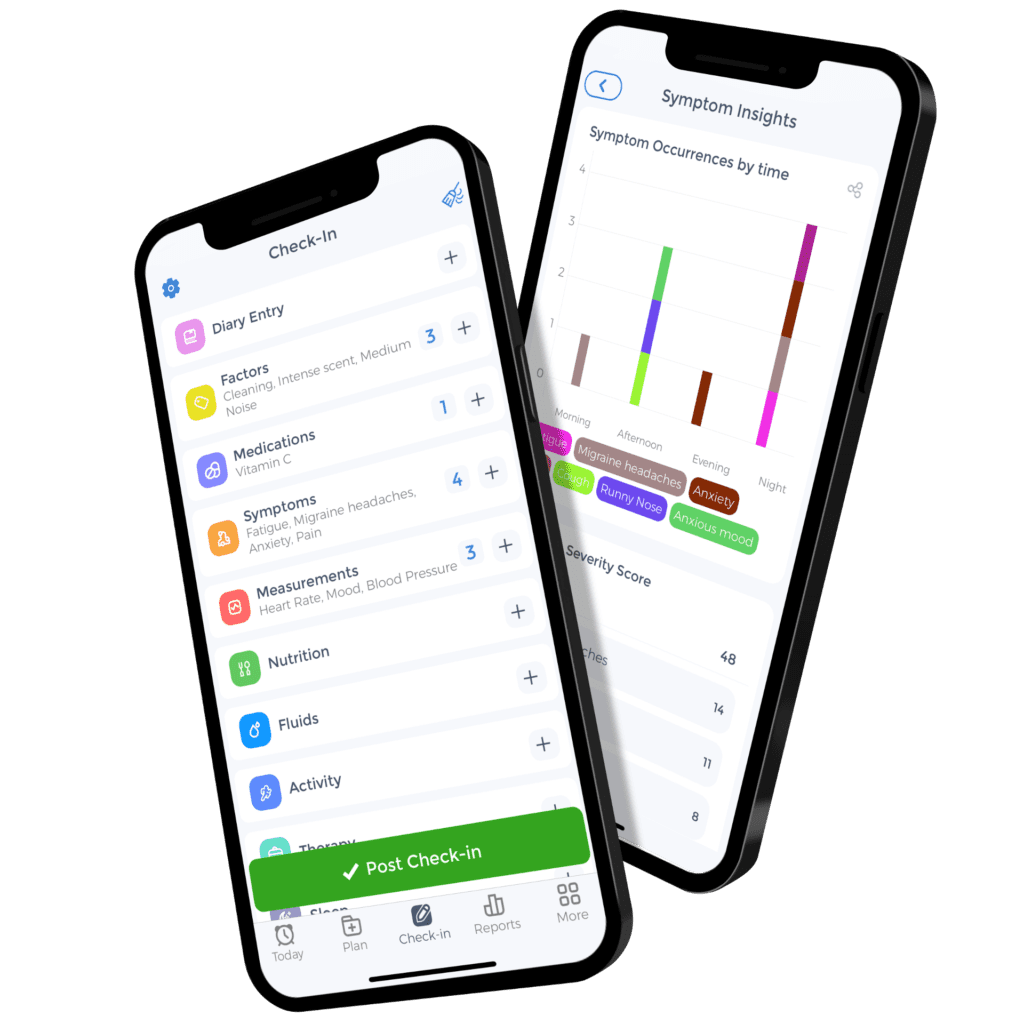
The CareClinic App simplifies preventative and proactive care management for you and your caregivers. CareClinic leverages AI to make setup and recording check-ins a breeze. CareClinic comes fully equipped to provide full outpatient care with medical assessments and content libraries.

It personalizes for you
CareClinic personalizes your treatment journey using AI based on your current health condition. You can always customize all aspects of the app anytime. CareClinic can reliably handle any regimen, no matter how complex. It is designed to work for over 3,500 medical conditions!

It provides insights
CareClinic is an all in one wellness tracker, which means it integrates into Apple Health, Google Fit, Siri and others. Your wearable data and day to day check-in data help generate logs, charts, and insights. This can be further exported and shared with your care provider to understand your treatment better.

A better care experience for
patients and caregivers
CareClinic has been clinically studied and is backed by scientific review to improve patient outcomes.
*Evaluation of Mobile Health Applications to Track Patient-Reported Outcomes for Oncology Patients: A Systematic Review
Get started for free, no credit card required.